

Overscheduling past approved units and letting authorizations lapse are the two most preventable causes of denied claims in home care. Both are timing problems, not effort problems. Set utilization alerts at 80 percent of approved units, set expiration alerts 30 to 45 days before the span end date, validate every booking against the authorization at the moment of scheduling, and route each alert to the role who can act on it. Review your thresholds quarterly against payer rules.
Why Authorization Errors Cost Home Care Agencies Revenue?
In home care, two of the costliest yet completely preventable authorization errors are overscheduling and expired authorizations. Both can disrupt care, delay payments, and invite compliance scrutiny from payers or auditors.
Overscheduling in home care occurs when a scheduler books visits that exceed the units or hours approved on a client's service authorization. The excess is typically denied or disallowed on audit, and the agency still carries the caregiver labor cost.
An expired authorization is one whose approved span end date has passed without a renewal in place. Services delivered after that date have no valid coverage, so claims reject and care continuity is put at risk.
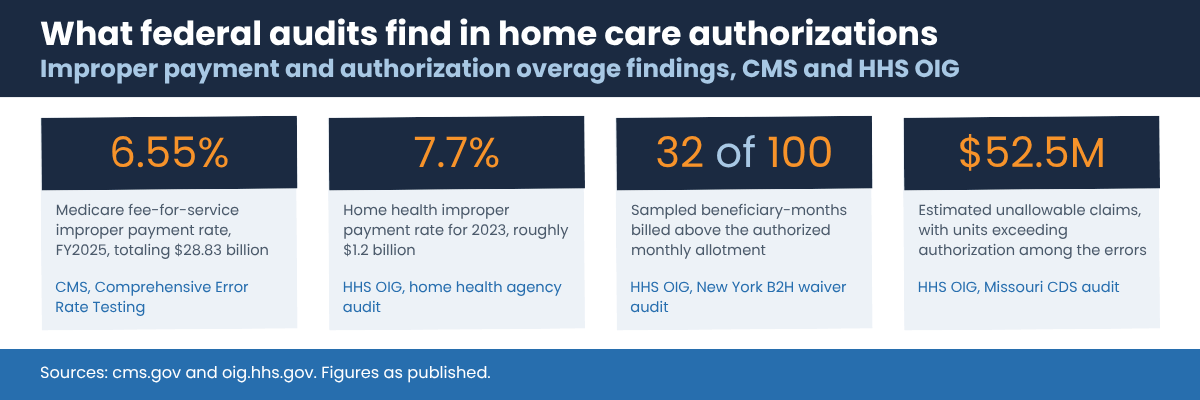
The scale of the problem shows up clearly in federal audit data. CMS reported a Medicare fee-for-service improper payment rate of 6.55 percent for fiscal year 2025, amounting to $28.83 billion, in its Comprehensive Error Rate Testing program results. For home health claims specifically, HHS OIG cited a 7.7 percent improper payment error rate for 2023, roughly $1.2 billion.
Medicaid audits point directly at authorization limits. In an audit of New York's Bridges to Health waiver program, OIG found that 32 of 100 sampled beneficiary-months included services billed in excess of the monthly allotment authorized in the plan of care, and estimated $3.3 million in federal reimbursement tied to that overage alone. A separate OIG audit of Missouri's consumer-directed personal care assistance program listed units of service charged that exceeded the number authorized among the errors behind an estimated $52.5 million in unallowable claims.
Even well-run agencies struggle with authorization management when processes rely on manual checks, spreadsheets, or siloed systems. Two patterns produce most of the exposure.
1. Overscheduling Beyond Approved Limits
Schedulers often book visits without realizing that a client's authorized hours or units are nearly exhausted. The caregiver completes the visit, documentation is submitted, and billing follows, only for the claim to be denied because it exceeded the payer-approved limit.
These mistakes lead to:
Lost revenue from non-billable visits
Compliance risk from services delivered outside payer terms
Extra administrative work to adjust, appeal, or write off claims
2. Expired Authorizations and Care Plans
When authorizations or plans of care lapse unnoticed, care continuity is disrupted. Visits may be delivered without valid coverage, or worse, clients may miss essential care while waiting for renewals.
Typical reasons include:
No system alerts for upcoming expirations
Poor coordination between clinical, scheduling, and billing teams
Delays in payer renewals or documentation submission
In both cases, the common thread is reactive management. Staff only notice the issue after a denial or an interruption occurs. We covered the downstream financial effect in more detail in how authorization gaps drive revenue loss in home care.
Where Do Home Care Authorizations Actually Break Down?
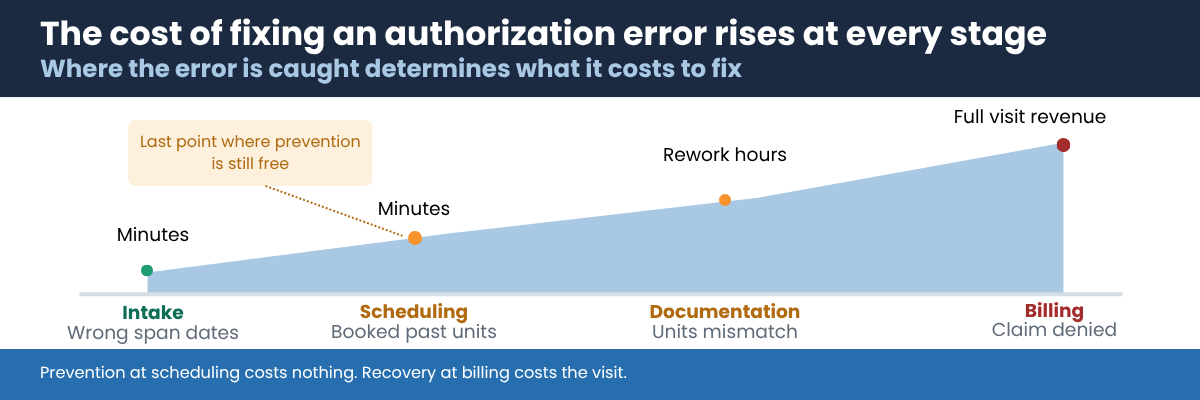
Authorization control is not a single task owned by a single person. It touches four handoffs, and a gap at any one of them produces the same denial.
1. Intake. The authorization is entered with wrong span dates, the wrong unit type, or the wrong service code. Everything downstream inherits the error. Confirming coverage at this stage matters, which is why agencies pair authorization entry with Medicaid eligibility verification before the first visit.
2. Scheduling. The visit is booked without checking remaining units or whether the visit date falls inside the authorization span. This is where most overages originate.
3. Documentation. The visit is delivered and documented, but the units recorded do not match the units authorized, or the service falls outside the approved plan of care.
4. Billing. The claim goes out. At this point the error is detectable but no longer preventable. All that remains is a write-off or an appeal.
Alerts help at every stage, but they pay for themselves at stage two. Preventing a bad booking costs nothing. Reversing a bad claim costs labor, admin time, and often the revenue itself.
A Baseline Process Any Agency Can Run This Week
You do not need new software to reduce authorization denials. If you are working from spreadsheets today, this manual baseline will catch most of the damage:
Maintain a single authorization register. One row per authorization, with client, payer, service code, unit type, approved units, span start date, span end date, and the staff member responsible.
Reconcile weekly. Every Monday, compare units delivered against units approved for every active authorization.
Flag two thresholds. Mark any authorization at or above 80 percent utilization, and any authorization whose span ends within 45 days.
Assign an owner to each flag. Utilization flags go to the scheduler and case manager. Expiration flags go to whoever handles payer renewals.
Track renewal status. Record the date the renewal was requested, the date it was submitted, and the date it was approved.
This works. It also stops working at scale, and it fails in a specific way worth naming: the register is accurate only as of the last reconciliation. A visit booked on Wednesday against an authorization that hit its limit on Tuesday will not surface until the following Monday, by which time the caregiver has already worked the shift.
That gap between the reconciliation and the booking is the entire problem.
Why Real-Time Alerts Matter?
Preventing authorization problems is not about working harder. It is about closing the gap between when something changes and when someone finds out.
Real-time alerts turn a reactive workflow into a proactive one, so agencies can address potential issues before they affect clients or revenue.
Here is why alerts matter:
They catch errors early, before a non-compliant visit is scheduled or billed.
They standardize communication across scheduling, clinical, and billing teams.
They support compliance audits by documenting that the agency identified the issue and acted on it.
CareVoyant Events and Alerts, part of the platform's care coordination and communication functions, takes this a step further, not only notifying staff but also automating the follow-up action that closes the loop.
How CareVoyant Events and Alerts Prevent Authorization Errors?
CareVoyant integrates authorization, plan of care, scheduling, clinical, and billing data into one connected system, so utilization is calculated against live scheduling and visit data rather than a periodic export. CareVoyant Events and Alerts monitors that data continuously and triggers notifications based on predefined rules and thresholds. The full feature set is described on the authorization and plan of care management page.
Let us look at how it works across key workflows.
1. Authorization Utilization Alerts
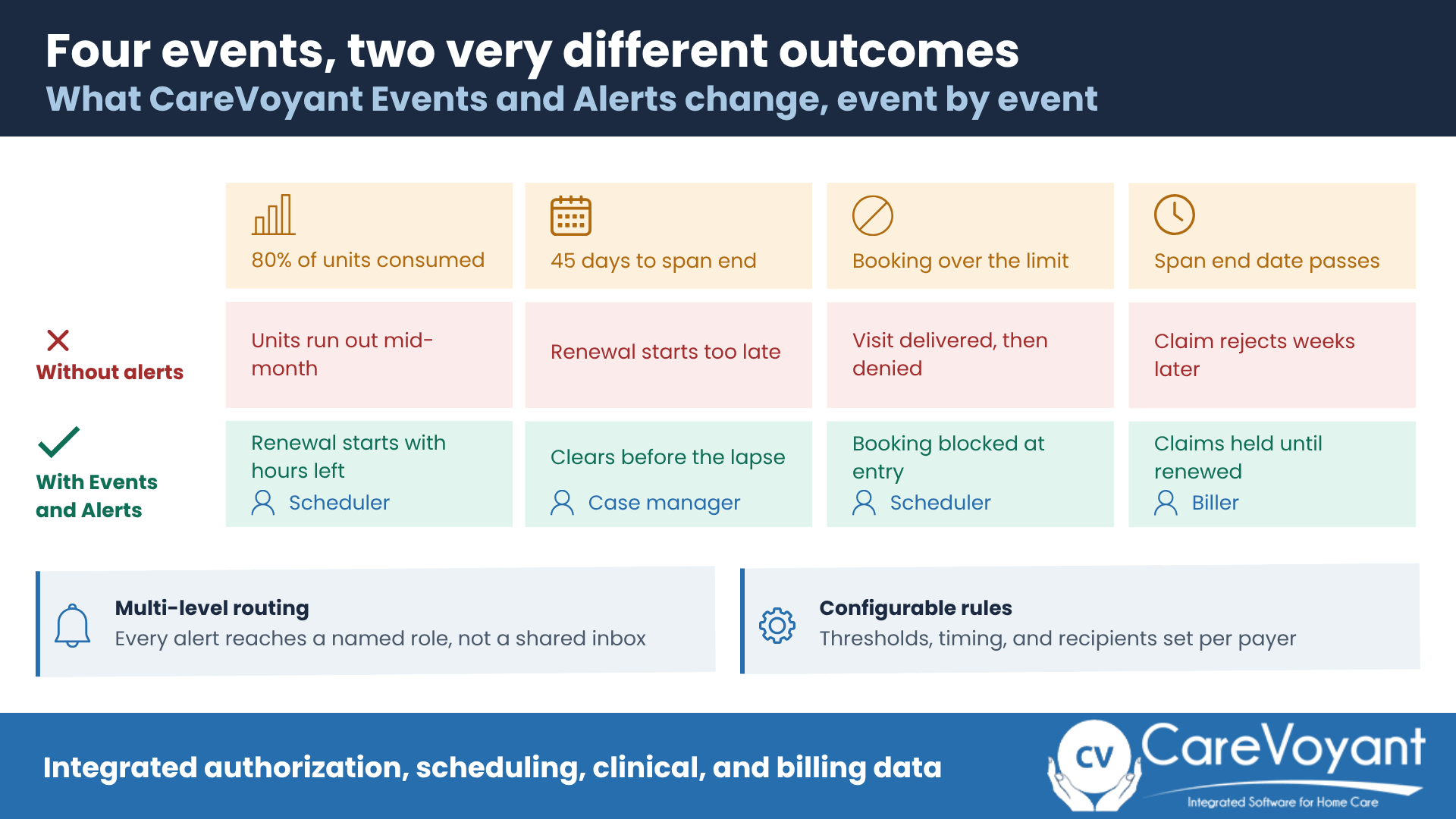
What It Does: Tracks every unit or hour consumed against the approved authorization. When usage crosses a set threshold, say 80 percent of total units, CareVoyant automatically sends an alert to the scheduler or case manager.
Why It Matters: This gives staff enough lead time to review service utilization, contact the payer about additional units, or adjust the care plan before hitting the limit.
Impact:
Prevents overscheduling and out-of-scope billing
Improves revenue capture by helping visits stay billable
Reduces back-and-forth between scheduling and billing teams
Example: A 200-hour Medicaid authorization is approaching 180 hours used. CareVoyant flags it in the scheduler's dashboard and sends an email alert to the administrator. Renewal paperwork is initiated with roughly 20 hours of coverage still available, which is usually enough runway for payer turnaround.
2. Expiration and Renewal Alerts
What It Does: Monitors authorization and care plan expiration dates and alerts staff before coverage ends. Users configure how early alerts are sent, commonly 15, 30, or 45 days in advance.
Why It Matters: Renewal processes often require multiple steps: documentation, physician signature, and payer approval. Early notification gives agencies time to complete those steps without disrupting care. Proactively notifying administrative staff about expiring authorizations is one of the core care coordination activities in CareVoyant.
Impact:
Prevents care gaps
Reduces compliance risk
Increases caregiver and client satisfaction by avoiding last-minute cancellations
Example: A skilled nursing authorization expires on June 30. On June 1, CareVoyant sends reminders to both the care coordinator and the billing team and generates the renewal task. The updated authorization is approved before the deadline, so no service interruption occurs.
3. Real-Time Scheduling Validation
What It Does: When a scheduler tries to book a visit, CareVoyant validates it against the client's authorization. If the date falls outside the span or the total hours exceed what is approved, the system displays a warning or blocks the scheduling action, depending on how the rule is configured.
Why It Matters: This stops errors at the source, before the caregiver is ever dispatched. Instead of discovering overages after billing, agencies prevent them. It is also the control that closes the weekly reconciliation gap described earlier.
Impact:
Helps visits stay within payer limits
Protects agencies from denials and compliance flags
Shortens training time for new schedulers
Example: A scheduler tries to book a 5-hour visit when only 3 authorized hours remain. CareVoyant's scheduler shows a real-time prompt: authorization limit exceeded, adjust visit duration. The issue is corrected instantly. More on this in must-have scheduling features for home care and on the home care scheduling software page.
4. Multi-Level Notifications for Teams
What It Does: CareVoyant's alerts are not one-size-fits-all. The system sends different alerts to different roles: schedulers, nurses, billing staff, or managers, based on who needs to act.
Why It Matters: Authorization management touches multiple departments. Targeted alerts put the notice in front of the right person immediately, avoiding miscommunication and duplicate work.
Impact:
Improves team coordination
Reduces internal emails and confusion
Enables faster issue resolution
Example: When an authorization nears 90 percent usage, the scheduler gets a dashboard alert. When it expires, billing gets a hold notice so no claim goes out against a lapsed authorization. Everyone knows their next step without chasing updates.
5. Customizable Alert Rules
What It Does: Agencies define alert thresholds, frequency, and recipients based on their own workflow and payer mix.
Why It Matters: Different payers have different tolerances for utilization and different renewal windows. Customization means CareVoyant fits your operational model, not the other way around.
Impact:
Supports Medicaid, Managed Care, commercial, and private pay
Adapts as agencies add lines of service
Keeps alerts meaningful rather than overwhelming
Example: A Managed Care program requires renewals 30 days in advance, while a commercial plan allows 10. CareVoyant's rules engine sends alerts accordingly, so staff follow payer-specific timelines automatically. Agencies running home and community based services alongside other lines generally need this flexibility from day one.
Best Practices to Maximize Authorization Alerts
If you are implementing authorization alerts, these practices deliver the most benefit:
Set early thresholds. Do not wait until 95 percent utilization. Trigger at 80 or 85 percent, so there is time to secure additional units.
Assign clear ownership. Define who responds to each alert type. An alert routed to a distribution list is an alert nobody owns.
Automate follow-up actions. Link alerts to tasks, renewal workflows, or schedule updates. Notification without a task is a reminder, not a control.
Review and tune alerts quarterly. Confirm they still match payer rules, your payer mix, and internal processes.
Educate your staff. Train schedulers and billers together. The two roles see different halves of the same problem, and joint training cuts the handoff delay.
Watch for alert fatigue. If staff routinely dismiss alerts without acting, the thresholds are too sensitive or the routing is wrong. Your reporting and dashboard views should show alert volume by type so you can catch this before it undermines the system.
The Takeaway: From Reactive to Predictive Authorization Management
Authorization management does not have to be a source of stress. With CareVoyant Events and Alerts, agencies move from reacting to problems toward predicting and preventing them.
By tracking utilization continuously, notifying teams before expirations, and validating schedules in real time, agencies stay compliant, bill with confidence, and help ensure clients receive uninterrupted care. No system guarantees a payer outcome, but moving the check earlier in the workflow removes most of the exposure.
CareVoyant Events and Alerts is more than a set of reminders. It is your agency's early warning system for compliance, cash flow, and care quality.
See how CareVoyant handles authorization tracking for your payer mix. Request a demo and we will walk through utilization alerts, expiration workflows, and scheduling validation using your service lines.
Frequently Asked Questions (FAQs)
-
The excess units are typically denied by the payer or disallowed on audit, and the agency still carries the caregiver labor cost. State Medicaid audit protocols commonly disallow units billed above the service authorization, and some also disallow services delivered at a frequency inconsistent with the authorization even when the total is within limits. Appeals rarely recover the full amount, which is why a validation check at the point of booking costs far less than a billing-stage catch.
-
Thirty to 45 days ahead of the span end date works for most Medicaid and Managed Care programs, because renewals require updated documentation, a physician signature, and payer processing time. Commercial payers with faster turnaround may only need 10 to 15 days. Set the window against the slowest payer in your mix rather than the average, and use the longer window for high-hour authorizations such as pediatric private duty nursing, where a lapse puts more hours at risk.
-
Yes. Systems that connect authorization data directly to the scheduling module can validate a booking against remaining units and the authorization span at the point of entry, then either warn the scheduler or block the action. Whether it warns or blocks is usually configurable by agency and by payer. The key requirement is that authorization and scheduling share the same live data, because a balance drawn from a weekly export is only as current as the last update.
-
Route them to at least two roles, and preferably three: the case manager or intake coordinator who owns the payer renewal, the billing team who must not submit claims against a lapsed authorization, and the scheduler who should not book past the span end date. A single alert to a shared inbox tends to fail, because responsibility becomes ambiguous and each recipient assumes someone else has acted. Assign a named owner per alert type.
-
Medicaid and waiver programs generally authorize a fixed number of units over a defined span, with strict documentation requirements and formal state audit protocols. Managed Care organizations set their own renewal windows and utilization review rules by contract, so two MCOs in the same state may require different lead times. Commercial insurers often authorize by visit count or episode with shorter cycles. Because the rules differ this much, configure alert thresholds per payer rather than uniformly.
About CareVoyant
CareVoyant is a leading provider of cloud-based integrated enterprise-scale home health care software that can support all home-based services under ONE Software, ONE Patient, and ONE Employee, making it a Single System of Record. We support all home based services, including Home Care, Private Duty Nursing, Private Duty Non-Medical, Home and Community Based Services (HCBS), Home Health, Pediatric Home Care, and Outpatient Therapy at Home.
CareVoyant functions – Intake, Authorization Management, Scheduling, Clinical with Mobile options, eMAR/eTAR, Electronic Visit Verification (EVV), Billing/AR, Secure Messaging, Notification, Reporting, and Dashboards – streamline workflow, meet regulatory requirements, improve quality of care, optimize reimbursement, improve operational efficiency and agency bottom line.
For more information, please visit CareVoyant.com or call us at 1-888-463-6797.
Request for Information
To learn more about CareVoyant Software and how we improve the operational efficiency of Home Healthcare Agencies, contact us:
