
What BYOD Means for Home Care Agencies?
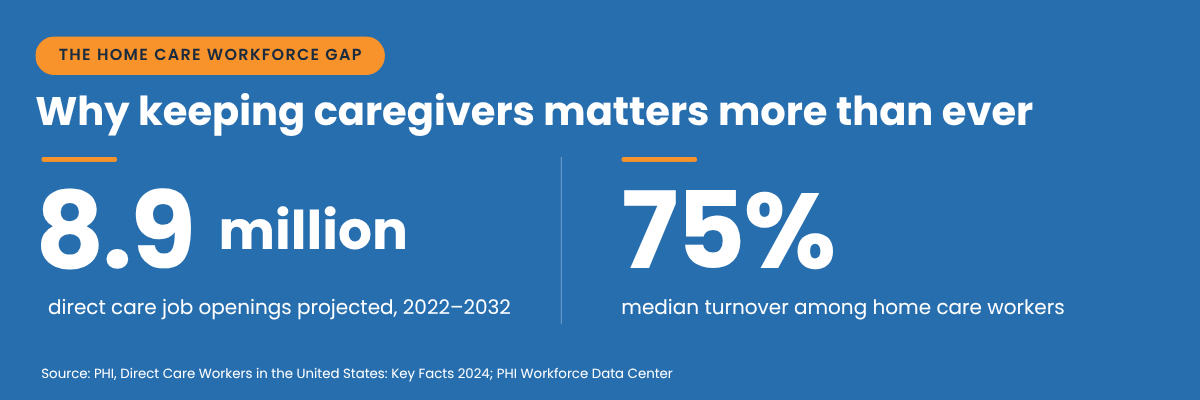
Home care agencies are hiring in one of the tightest labor markets in the country. PHI projects 8.9 million direct care job openings between 2022 and 2032, once you count workers who change occupations or leave the labor force. Keeping the caregivers you already have matters just as much: median turnover among home care workers is 75%. Many of the reasons employees quit home care jobs show up in day-to-day work.
Device policy is a small part of that picture, but caregivers feel it on every shift. A Bring Your Own Device (BYOD) policy lets field staff use the smartphones and tablets they already own for scheduling, visit documentation, and Electronic Visit Verification (EVV). Done well, BYOD lowers hardware costs and removes the second phone from a caregiver's pocket. Done poorly, it creates wage-and-hour exposure and security gaps.
This guide covers what a BYOD policy for home care agencies should include, the costs and legal rules to check before rollout, and how HIPAA applies when care documentation happens on a personal device.
Why Home Care Agencies Are Moving to BYOD?
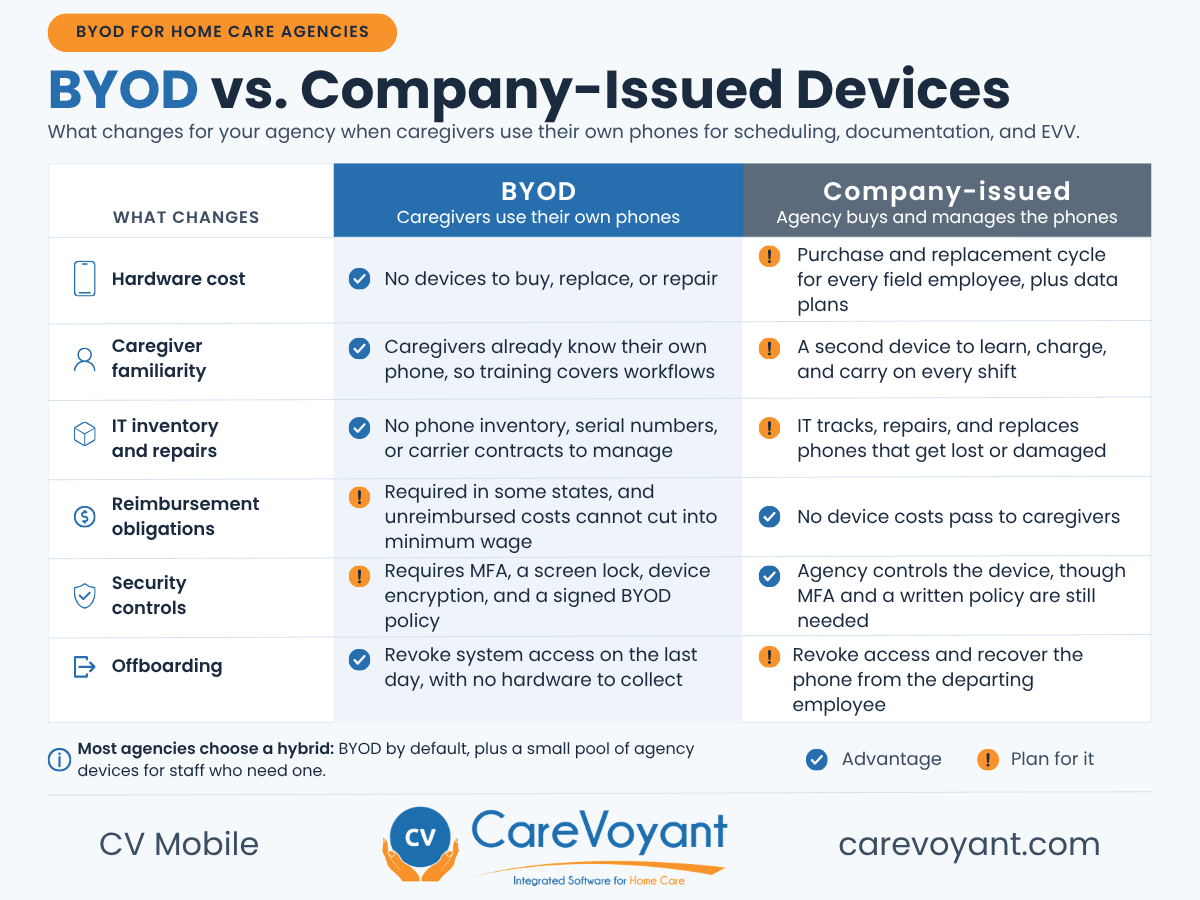
Most caregivers already carry a smartphone they use all day. Issuing a second, company-owned phone means one more device to charge, carry, and learn. Company phones also get left at home, lost between visits, or returned damaged when an employee leaves.
With BYOD, caregivers work on a device they already know. Onboarding time goes toward your agency's workflows and your software instead of a new piece of hardware. For agencies, it means fewer phones to buy, track, repair, and replace.
Mobile, device-independent workflows also hold up at scale. Phoenix Home Care and Hospice runs its Private Duty Nursing line on CareVoyant, covering nearly 1,000 nurses and more than 2,500 shifts a week. In a G2 review, Brian Rigsby, SEVP of IT, credits mobile EVV clocks with GPS validation and real-time schedule monitoring for a virtual elimination of paper timesheets. Nurses cannot clock in without a schedule, and supervisors review nursing documentation as it is completed instead of "finding out 30 days too late that charting was incomplete."
"No more … finding out 30 days too late that charting was incomplete." Brian Rigsby, SEVP of IT, Phoenix Home Care and Hospice, on running nearly 1,000 nurses and 2,500+ weekly shifts on CareVoyant.
What a Device-Agnostic Platform Makes Possible?
BYOD only works if your software behaves the same way on every device. CareVoyant's "ONE Software" approach means CV Mobile gives caregivers the same scheduling, documentation, and EVV workflow on the smartphones and tablets they already carry.
What Caregivers Need on Their Own Phones
The bar for a personal device is low. For CareVoyant's mobile web access, a caregiver needs:
Phone or tablet: Any Android or Apple iOS phone or tablet running Android 8.0 or iOS 11 or higher. Both versions were released in 2017, so most phones caregivers carry today will qualify.
Screen: At least 4.7 inches with a resolution of 360x640 or higher.
Browser: Google Chrome or Safari.
Connection: A steady Wi-Fi, 5G, or 4G connection of at least 100 kbps. 3G is not supported, and offline mode covers visits in dead zones.
Caregivers or supervisors who prefer a larger screen can use CV Web in Chrome or Edge on Windows 10/11 laptops, Macs, Chromebooks, or Apple and Android tablets. Tablets need at least a 10-inch, 1280x800 screen, 4 GB of RAM, and 32 GB of storage.
Faster Onboarding
Staff already know how to use their own phones, so training time goes to visit workflows, documentation standards, and agency policies. It is one of the simplest ways to reduce software training time for new hires.
Real-Time Data Flow
Visit notes, signatures, and EVV data sync to intake, scheduling, and billing as they are captured, whatever device the caregiver uses. That matters because the 21st Century Cures Act requires states to use EVV for Medicaid personal care and home health services. For more on meeting those rules, see our guide to achieving EVV compliance with integrated home care software.
Less IT Overhead
Your team no longer manages a phone inventory, serial numbers, carrier contracts, or hardware repairs for hundreds of field employees.
The Real Costs of BYOD and What You Owe Caregivers
The savings from BYOD are real: no device purchases, no replacement cycle, and no company data plans. But BYOD shifts some cost to employees, and federal and state law limit how far that shift can go. This is the part of BYOD planning agencies most often skip.
Federal Minimum Wage Rules
Under the Fair Labor Standards Act, wages must be paid "free and clear." When an employer requires staff to supply tools of the trade needed for the job, the cost of those tools cannot cut into minimum wage or required overtime pay. For aides paid close to minimum wage, an unreimbursed phone or data bill can create a violation.
State Reimbursement Laws
Some states go further. California Labor Code section 2802 requires employers to reimburse necessary work expenses, and California courts have applied it to personal cell phone use. Illinois amended its Wage Payment and Collection Act in 2019 to require reimbursement of necessary work expenditures, which can include phones. Other states have similar rules, so check the requirements in every state where you employ caregivers.
Setting a Technology Stipend
Many agencies handle reimbursement with a flat monthly technology stipend. Base the amount on your state's rules and your staff's actual usage, put it in writing, and review it with employment counsel before rollout. A stipend that is too low can cost more in back pay and penalties than the phones it replaced.
Before you set a stipend: Under federal law, unreimbursed phone costs cannot push a caregiver's pay below minimum wage. California and Illinois also require reimbursement of necessary work expenses, so review your policy with employment counsel before rollout.
HIPAA and BYOD: What Applies Today
HIPAA does not ban personal devices. What matters is how protected health information (PHI) is accessed, transmitted, and stored. The current HIPAA Security Rule already requires safeguards such as access controls, audit controls, and transmission security for electronic PHI, whether the device belongs to the agency or the caregiver.
In January 2025, HHS proposed a major update to the Security Rule that would make encryption and multi-factor authentication (MFA) mandatory for systems that handle electronic PHI. As of September 2026, that rule is still a proposal, and HHS now targets July 2027 for final action. Agencies that put MFA and encryption in place now will be ready if and when it takes effect.
Where the HIPAA update stands: The Security Rule overhaul is still a proposal, and HHS now targets July 2027 for final action. It would make MFA and encryption mandatory, and CareVoyant supports both today.
How CareVoyant Protects Agency Data
Cloud-based platform: As cloud-based home care software, CareVoyant stores and manages client records centrally rather than on individual devices.
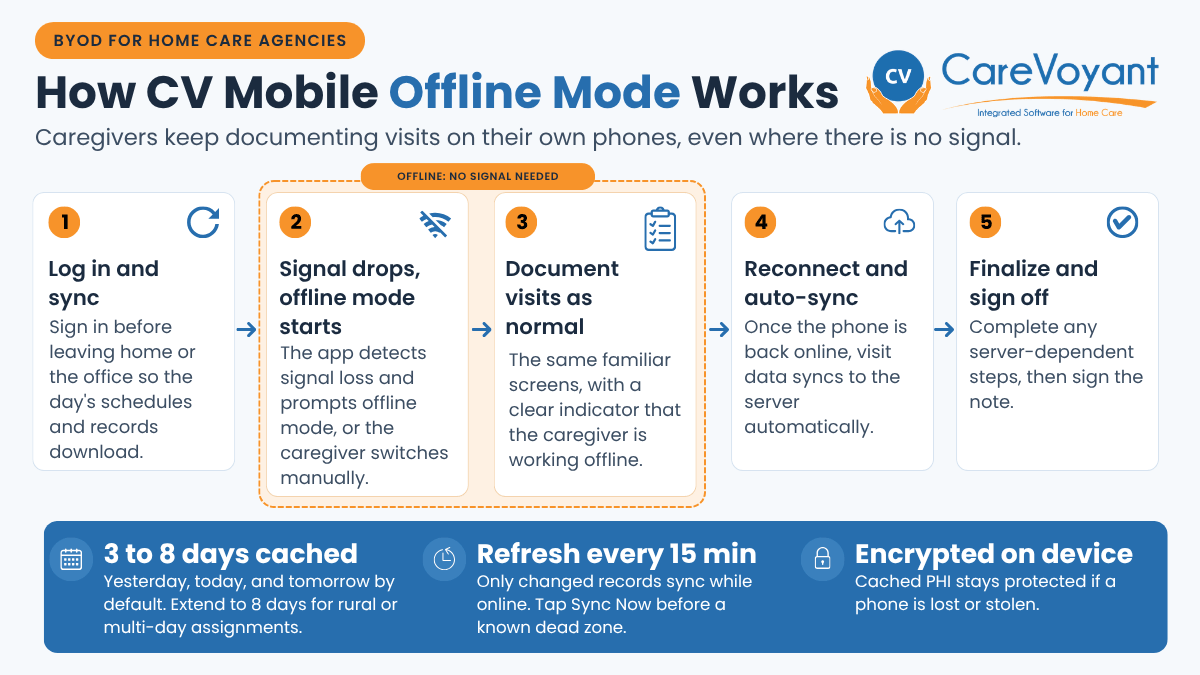
Encrypted offline documentation: When a caregiver logs in, CV Mobile stores an encrypted snapshot of schedules, patient records, and note templates on the device. By default it covers yesterday, today, and tomorrow, and agencies serving rural areas or multi-day assignments can extend it to eight days. Caregivers document as normal without a signal, and the data syncs automatically when they reconnect. Because the local cache is encrypted, PHI on the device stays protected even if a phone is lost or stolen.
Multi-factor authentication: CareVoyant supports MFA, so only authorized staff can sign in, even from a personal device.
Secure messaging: Secure care team messaging replaces personal texts and email for care coordination, keeping communication inside the platform.
Software Is Only Half the Answer
Platform security does not replace a written BYOD policy. You still need signed staff acknowledgments, a lost-device process, and clear offboarding steps. The checklist below covers the essentials.
BYOD Policy Checklist for Home Care Agencies
A strong BYOD policy for home care agencies should cover these nine points:
Eligible devices: List supported device types and minimum versions, such as Android 8.0 or iOS 11 and higher, a 4.7-inch or larger screen, and Chrome or Safari.
Signed acknowledgment: Every caregiver signs the policy before accessing client data on a personal device.
Reimbursement terms: Define the stipend or reimbursement method and confirm it meets federal and state law.
Security basics: Require a screen lock, MFA, current OS updates, and no screenshots or downloads of client information.
Lost or stolen devices: Set a reporting deadline and the steps IT takes, such as ending active sessions and resetting credentials.
Offboarding: Revoke system access on the employee's last day.
Privacy boundaries: Explain what the agency can and cannot see on a personal device, including when GPS-based mobile EVV captures location.
Alternatives: Offer an agency device or other option for staff without a compatible phone.
Annual review: Revisit the policy yearly and whenever HIPAA or state rules change.
Pro tip: Heading into a known dead zone? Tap Sync Now in CV Mobile first for an on-demand refresh, with no need to log out and back in.
BYOD as a Retention Tool
Documentation done after hours is one of the most common complaints among field staff. When caregivers can complete notes, signatures, and EVV at the point of care on a device they already carry, less work follows them home at night. That reduced friction supports the broader employee retention strategies for home care that keep staff with your agency.
Conclusion: Build a BYOD Program Caregivers Trust
BYOD can cut hardware costs and make daily work easier for field staff, but only when it rests on fair reimbursement, sound security, and a clear written policy. Get those right, and the device in a caregiver's pocket becomes one less reason to leave.
CareVoyant's home care software and CV Mobile give caregivers the same workflow on every supported device while keeping client data protected. Schedule a CV Mobile demo to see how it fits your BYOD plans.
Frequently Asked Questions
-
It depends on the state. Federal law requires that unreimbursed work expenses never push pay below minimum wage, and states such as California and Illinois require reimbursement of necessary work expenses. Confirm the rules in each state where you operate.
-
BYOD is not compliant or non-compliant on its own. Compliance depends on your safeguards: access controls, MFA, encryption, secure messaging, and a written policy that staff follow.
-
The caregiver reports the loss right away, and your team ends active sessions and resets credentials. Any schedules and patient records cached by CV Mobile are encrypted on the device, so PHI stays protected while you close off access.
-
Yes. Agencies can issue devices to those staff, and many state EVV programs accept alternatives such as landline telephony or fixed in-home devices. Review EVV requirements by state for approved options.
-
For CareVoyant, an Android phone running 8.0 or higher or an iPhone running iOS 11 or higher, with a screen of at least 4.7 inches, Chrome or Safari, and a Wi-Fi, 5G, or 4G connection. 3G is not supported.
-
Yes. CV Mobile stores an encrypted snapshot of upcoming schedules and patient records at login, so caregivers can document visits offline. Everything syncs automatically once the phone reconnects, and any server-dependent steps are completed then.
About CareVoyant
CareVoyant is a leading provider of cloud-based integrated enterprise-scale home health care software that can support all home-based services under ONE Software, ONE Patient, and ONE Employee, making it a Single System of Record. We support all home based services, including Home Care, Private Duty Nursing, Private Duty Non-Medical, Home and Community Based Services (HCBS), Home Health, Pediatric Home Care, and Outpatient Therapy at Home.
CareVoyant functions – Intake, Authorization Management, Scheduling, Clinical with Mobile options, eMAR/eTAR, Electronic Visit Verification (EVV), Billing/AR, Secure Messaging, Notification, Reporting, and Dashboards – streamline workflow, meet regulatory requirements, improve quality of care, optimize reimbursement, improve operational efficiency and agency bottom line.
For more information, please visit CareVoyant.com or call us at 1-888-463-6797.
Request for Information
To learn more about CareVoyant Software and how we improve the operational efficiency of Home Healthcare Agencies, contact us:
