

Cloud-based home care software lets agencies cut IT overhead, meet HIPAA and EVV obligations across multiple states, keep field staff working during outages, and respond to payer audits without digging through local servers. For agencies operating in more than one state or across more than one service line, the cloud is now the practical baseline rather than an upgrade.
Introduction
Home care agencies work in one of the most heavily regulated corners of healthcare. Caregiver shortages, rising labor costs, state EVV mandates, payer audits, and growing family expectations all land on the same back office at once. Legacy on-premises software was not built for that pace of change.
Cloud-based home care software is not simply an IT decision anymore. It determines how fast an agency can add a branch, respond to a state rule change, or produce visit documentation when a payer asks for it. The U.S. Department of Health and Human Services notes that widespread health IT adoption improves care quality, reduces costs, and increases administrative efficiency.
Below are ten reasons agencies are making the move, followed by an honest look at what the transition actually involves.
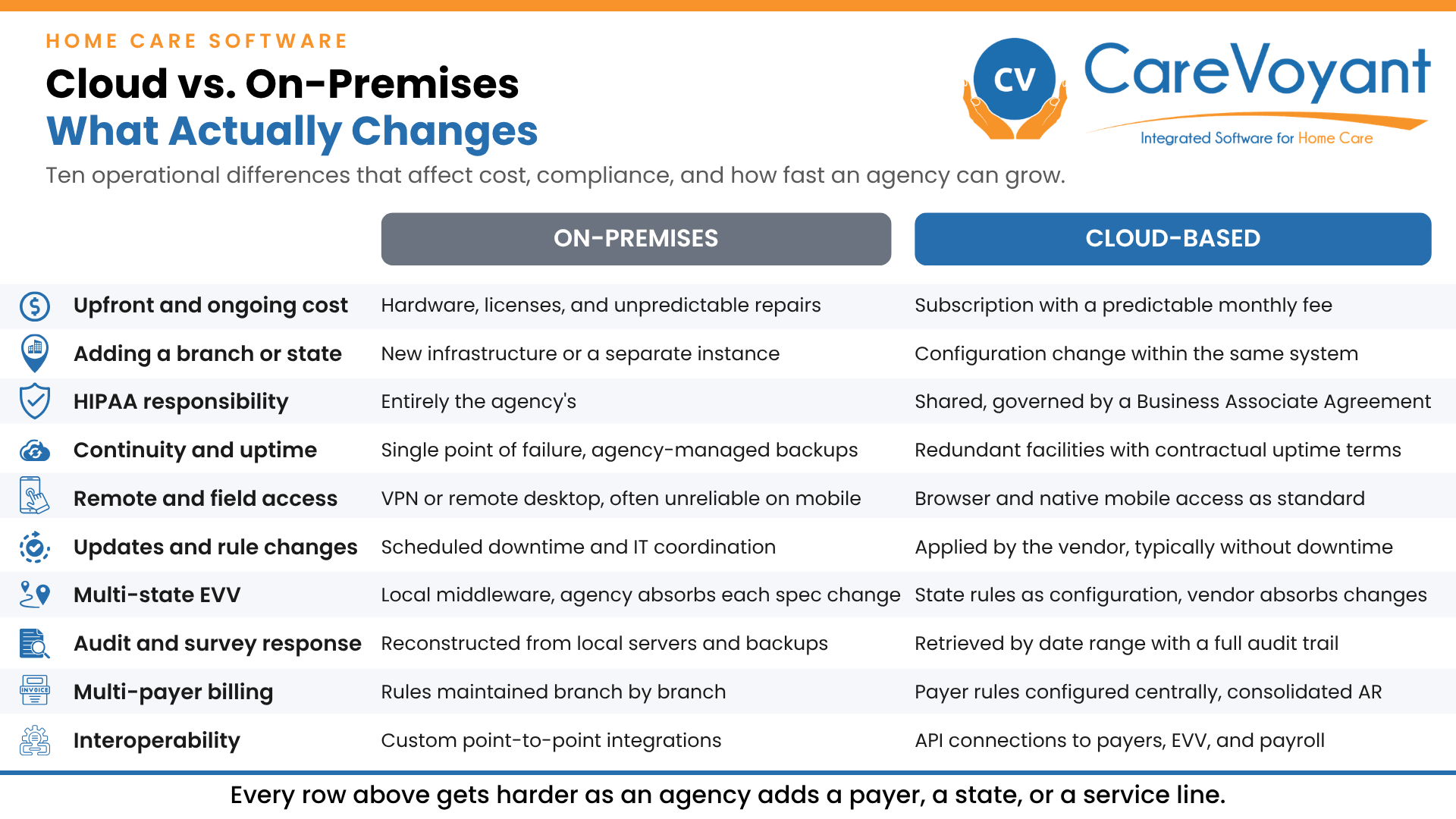
Ten operational differences between cloud-based and on-premises home care software.
1. Lower IT Costs and Predictable Budgeting
On-premises systems ask agencies to run a small data center they never wanted. Servers, operating system patches, backup tapes, and after-hours emergency support all come out of a budget that would otherwise go to caregivers.
A cloud-based platform:
Removes on-site server and hardware purchases
Reduces dependence on external IT support contracts
Converts irregular capital expense into a predictable operating cost
Ends the four-to-five-year hardware replacement cycle
Why it matters in home care: Margins in home care are thin, and IT spend competes directly with caregiver wages, recruiting, and training. NIST's guide for IT decision makers covers the economic considerations, performance, and reliability trade-offs agencies should weigh when comparing deployment models. Build the comparison over five years, not one, and include the staff hours currently spent babysitting a server. Agencies working with constrained budgets often find the fastest return comes from using technology to do more with less rather than adding headcount. If you are unsure whether the timing is right, there are usually clear signs an agency has outgrown its current software.
2. Built for Multi-Location and Multi-State Expansion
Agencies rarely stay in one lane. A personal care agency adds skilled nursing. A single-branch operation opens a second office two counties over. A Missouri agency wins contracts in Kansas.
A cloud platform lets agencies:
Add branches, users, and service lines without new infrastructure
Run multiple states from one system with state-specific rules configured per location
Give corporate leadership consolidated reporting across every branch
Onboard an acquired agency without merging two separate server environments
Why it matters in home care: Growth by acquisition is common, and nothing slows an acquisition like two incompatible systems. State health agencies have adopted the same reasoning: North Carolina DHHS built its own cloud strategy around scalable, resilient, and elastic infrastructure.
Expansion usually means new service types, not just new territory. A single cloud platform can carry home health, private duty nursing, non-medical personal care, HCBS, and pediatric home care under one client record. That is the practical mechanic behind service diversification as a growth strategy, and it only works if the software supports multiple lines of service natively.
What this looks like in practice: Optimae LifeServices operates home health, behavioral health, community services, and a nursing home. COO Susan Martin describes the value plainly, saying CareVoyant lets them "run them through a single billing system." Their subsidiary Optimae Home Health serves residents across 14 southeast Iowa counties, funded through self-pay, private insurance, Medicare, and Medicaid. The full Optimae case study covers how the consolidation was handled.
3. Stronger Data Security and HIPAA Compliance
Home care agencies hold clinical records, Social Security numbers, caregiver background checks, and payroll data. Most cannot staff a full-time security team.
A credible cloud platform provides:
Encryption of data in transit and at rest
Role-based access so a caregiver sees only their assigned clients
Audit trails showing who viewed or changed a record and when
Continuous monitoring and security patching
A signed Business Associate Agreement defining each party's obligations
Why it matters in home care: HHS Office for Civil Rights guidance is explicit that a cloud service provider handling ePHI on an agency's behalf is a business associate under HIPAA and is directly liable for safeguarding that data under the Security Rule. That is a genuine transfer of risk, but it is shared rather than eliminated. The agency still owns its risk analysis, its access policies, and its workforce training.
One caution worth naming: the cloud does not make an agency breach-proof. OCR investigates every breach affecting 500 or more individuals, and weak passwords and unmanaged devices remain common causes regardless of where the software runs. Security posture is one of the questions worth pressing hard on when selecting a software partner, alongside the BAA terms and the vendor's incident history.
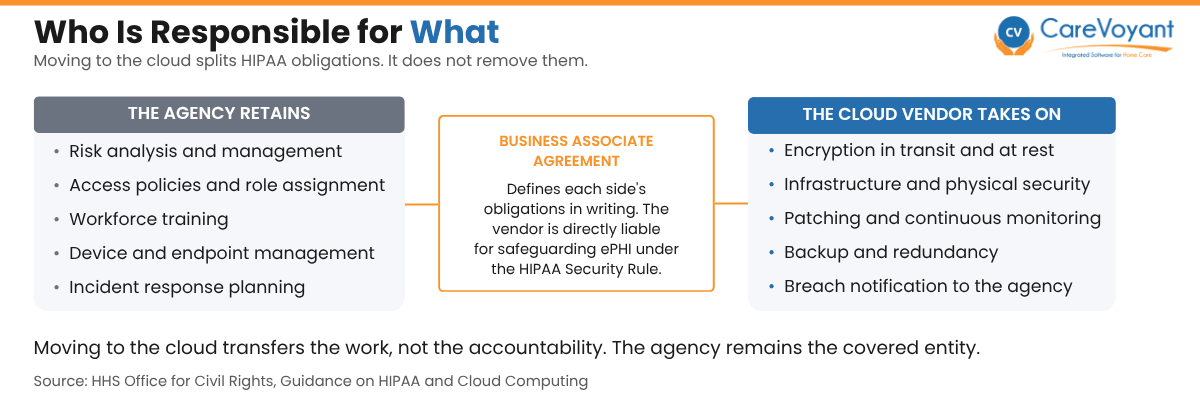
Cloud deployment divides HIPAA obligations between the agency and the vendor. It does not transfer accountability.
4. Business Continuity and Reliable Uptime
Hurricanes, ice storms, power failures, ransomware, and a flooded server closet all produce the same result on an on-premises system: nobody can see the schedule.
Cloud-based systems provide:
Automated backups without staff intervention
Data replicated across geographically separate facilities
Contractual uptime commitments and published incident reporting
Office-independent access, so coordinators can work from home during a closure
Load-balanced infrastructure that holds up during peak scheduling windows
Why it matters in home care: Visits do not pause for a disaster. Clients still need medication reminders and wound care on the day the office loses power. Contingency planning is an explicit HIPAA Security Rule requirement, and NIST's implementation guidance covers the security controls and resources regulated entities should map to it. Continuity also depends on people, not just infrastructure, which is why real-time visibility into what is happening in the field matters most on the days operations are disrupted.
5. Real-Time Access for Field Staff and Office Teams
Caregivers, nurses, therapists, and supervisors are almost never in the same building. The office learns about a missed visit or a change in condition only as fast as its slowest communication channel.
Cloud software enables:
Secure mobile access to schedules, care plans, and tasks
Point-of-care documentation instead of end-of-week paper catch-up
Immediate visibility when a caregiver clocks in late or misses a visit
Two-way messaging between field staff and coordinators
Same-day visibility into open shifts for schedulers
Why it matters in home care: Late documentation is the root cause of most billing rework and most survey findings. Research on health information systems has consistently found that cloud deployment improves data accessibility and collaboration across clinical teams. In practice this shows up as documentation captured in the patient's home rather than reconstructed later, and as a mobile app that handles scheduling and EVV in one place so caregivers are not switching between tools mid-shift. Better field-to-office flow also strengthens care team communication, which is where quality problems tend to originate.
What this looks like in practice: Dawn Harkins, RN, BSN, Administrator and Owner of Elite Home Care, describes updating a patient's medication profile and administration record in real time, which she credits with helping the agency "reduce medication errors and increase documentation accuracy." That is the clinical case for real-time access rather than the administrative one. When the record updates as care is delivered, the next caregiver works from current information instead of last week's.
6. Automatic Updates and Regulatory Readiness
Home care rules change constantly, and rarely in unison. A state adds a required data element to its EVV feed. A payer changes an authorization format. A new documentation requirement takes effect in ninety days.
Cloud platforms:
Deploy updates centrally, without an agency-side installation project
Push regulatory changes to every branch at the same time
Remove the risk of branches running different software versions
Shorten the gap between a rule taking effect and the software supporting it
Why it matters in home care: On an on-premises system, every regulatory change becomes an internal IT project with a deadline the agency did not choose. Cloud delivery models are recognized for enabling faster access to new capabilities and services without infrastructure work at the customer site. OASIS-E2 compliance in 2026 is a current example of the pattern: a firm effective date, new data elements, and no room for a delayed upgrade cycle. Agencies with complex requirements get further with configurable software than with systems that need vendor development work for every state variation.
7. Faster EVV Connectivity and State-by-State Configuration
This is the reason most specific to home care, and the one legacy systems handle worst.
Cloud-based software helps agencies:
Connect to state EVV aggregators without local middleware
Configure different EVV rules for each state from one system
Correct rejected visit records before they turn into denied claims
Absorb state specification changes as a vendor-side update
Why it matters in home care: Section 12006(a) of the 21st Century Cures Act requires states to mandate EVV for Medicaid personal care services and home health services, and states that fall short face incremental federal matching rate reductions of up to one percent. That pressure flows straight down to providers.
Every state built its own model, so an agency working across three states is effectively meeting three sets of technical specifications at once. EVV requirements vary considerably by state, and agencies submitting to multiple aggregators across several states and payers carry the heaviest configuration burden of anyone in the industry. Integrated EVV software that treats state rules as configuration rather than custom code is the difference between absorbing a specification change and scrambling for it. It also helps to separate what is actually required from the myths that circulate about EVV.
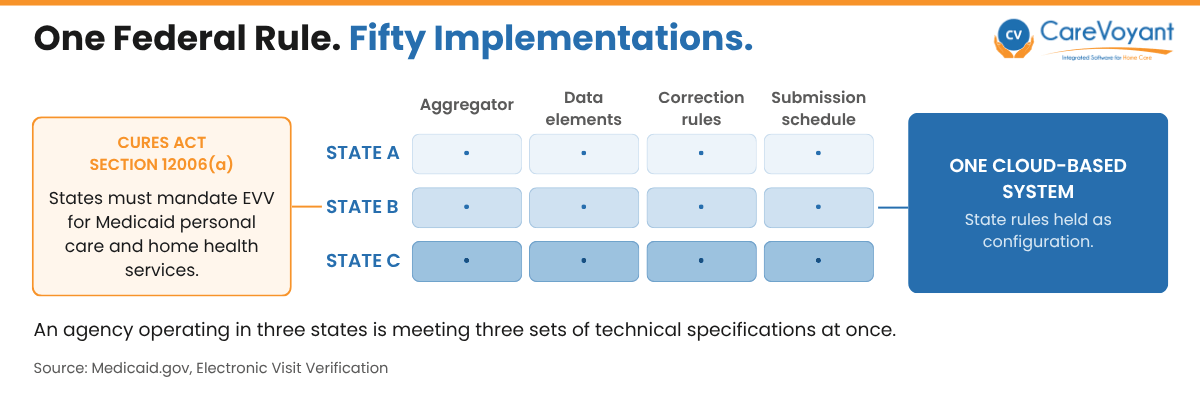
One federal EVV mandate produces a different technical specification in every state. An agency operating across three states meets three at once.
8. Simplified Payer Audit and Survey Response
An audit request arrives with a short deadline and a list of client names. What happens next says a lot about the software.
Cloud systems make it possible to:
Pull visit records, care plans, and signatures for a date range in minutes
Show a complete audit trail of who documented what and when
Match EVV records to submitted claims before a payer does it for you
Give an auditor or surveyor scoped, read-only access instead of printed binders
Retain records without depending on an old backup tape being readable
Why it matters in home care: EVV and personal care services remain an active oversight priority. The HHS Office of Inspector General maintains ongoing work examining whether states implemented EVV correctly and whether in-home personal care claims met federal and state requirements. Agencies that can produce complete documentation quickly spend far less on audit response than agencies reconstructing it after the fact.
The same capability carries over to state surveys and program integrity reviews. Whether the trigger is an OIG billing review, a consumer-directed services audit, or a scheduled agency survey, the underlying question is the same: can you retrieve complete, timestamped documentation on demand?
9. Multi-Payer Billing Across Medicaid, Medicare, MA Plans, and Private Pay
Most agencies bill several payer types at once, each with its own authorization structure, rate table, claim format, and timely filing window.
A cloud platform supports:
Separate billing rules per payer within one client record
Authorization tracking that flags exhausted units before the visit happens
Clean claim generation for Medicaid, Medicare, Managed Care, VA, and private pay
Consolidated AR reporting across all payers and all branches
Rate and rule updates delivered centrally rather than configured branch by branch
Why it matters in home care: Billing complexity multiplies with each state and each payer added, and it varies widely. CMS publishes state-by-state EVV compliance status for personal care services, which illustrates how differently individual states have implemented the same federal requirement. Systems built for a single payer in a single state break down quickly under that variation.
Most of the revenue lost here is avoidable. Authorization mismanagement quietly drains revenue when units run out mid-week and nobody notices, which is why authorization and plan of care management belongs in the same system as scheduling rather than in a spreadsheet beside it. Agencies pursuing payer diversification should confirm their billing and revenue cycle platform can handle the new payer before signing the contract, not after.
10. Easier Integration and Interoperability
Home care software does not operate alone. It has to exchange data with payroll, accounting, background check vendors, referral sources, EVV aggregators, and increasingly with hospital and health plan systems.
Cloud platforms make integration easier through:
Documented APIs instead of one-off custom bridges
Standard data formats that referral partners can consume
Faster connection of new tools as the agency adds them
Fewer manual exports, re-keyed entries, and reconciliation spreadsheets
Why it matters in home care: Duplicate data entry between systems is a hidden staffing cost that most agencies never quantify. Every visit that has to be re-keyed from scheduling into payroll and again into accounting is an opportunity for a discrepancy that surfaces weeks later in a reconciliation. The alternative is one integrated system where intake, scheduling, clinical, billing, and payroll share the same data. When a hospital partner or health plan asks for a data feed, the agency that can supply one keeps the referral relationship.
What this looks like in practice: Tom Glatt, CEO and Owner of Nightingale Home Care, points to having "a single patient record in one database for our lines of business." The operational consequence is that a client moving between private duty home care and home health does not become two records that have to be reconciled at billing time.
What Agencies Ask Before Moving to the Cloud
The case for cloud is strong, but the transition is a real project. These are the objections that come up most often, and they deserve straight answers.
What happens to our data during migration?
Client demographics, active authorizations, care plans, and historical visit data are typically mapped and imported. Historical documentation from a very old system sometimes cannot be migrated cleanly, in which case agencies keep read-only access to the legacy system for the retention period. Ask any vendor exactly which data elements they migrate and which they do not, in writing.
What if the internet goes down, or a caregiver has no signal?
This is a legitimate concern in rural service areas. A capable mobile app caches the schedule and captures visit data offline, then syncs when connectivity returns. Confirm that offline capture is real functionality and not a roadmap item.
How long does it take, and how much does it disrupt operations?
Most home care implementations run several weeks to a few months depending on census, number of payers, and how clean the existing data is. The work is heaviest on the agency's side during data cleanup, which is often the step that gets underestimated. Training is the other commonly underestimated piece, though there are practical ways to reduce software training time without cutting corners on competency.
Is it actually cheaper?
Over one year, sometimes not. Over five years, once hardware refresh, IT support, and staff time are counted, cloud usually wins. Run the comparison honestly rather than assuming either answer.
We are a single-branch agency. Do we need this?
Not urgently, if you are not growing, not adding payers, and not operating in a state with a demanding EVV model. The case gets much stronger the moment any of those change.
Conclusion: The Cloud Is Now the Practical Baseline for Home Care
Home care agencies are managing more payers, more states, more regulatory detail, and tighter margins than they were five years ago. On-premises software can still run a stable single-branch operation. What it cannot do well is absorb change quickly, and change is the defining condition of this industry right now.
For agencies that plan to grow, add service lines, cross state lines, or simply stop losing hours to audit preparation and duplicate data entry, the cloud is the more sustainable foundation. Start by mapping your own requirements against the full feature set a modern home care platform should cover.
Before shortlisting any vendor, talk to agencies that already run the system at your size and in your states. You can read what CareVoyant customers say about running multiple service lines on one platform, and check independent verified reviews on G2.
Take the next step: See how CareVoyant handles multi-state EVV, multi-payer billing, and audit-ready documentation in a single system. Request a demo.
Frequently Asked Questions (FAQs)
-
It can be, but compliance is shared rather than automatic. The vendor must sign a Business Associate Agreement and is directly liable for safeguarding ePHI under the Security Rule. The agency remains responsible for its own risk analysis, access controls, device management, and workforce training.
-
Typically several weeks to a few months. Timeline depends on census size, number of payers and states, and the condition of existing data. Data cleanup on the agency side is usually the longest step.
-
A well-built mobile app stores the caregiver's schedule locally and captures visit start and end times offline, syncing once the device reconnects. Office staff can work from any location with connectivity, since the system is not tied to an office server.
-
Usually not, once you include server replacement, IT support contracts, backup management, and internal staff hours. A one-year comparison often favors on-premises; a five-year comparison generally does not.
-
Yes. State-specific EVV rules, payer requirements, rate tables, and documentation formats can be configured per location within a single system, with consolidated reporting across all branches.
-
The agency does. Confirm this explicitly in the contract, along with the format and timeline for data return if the relationship ends.
About CareVoyant
CareVoyant is a leading provider of cloud-based integrated enterprise-scale home health care software that can support all home-based services under ONE Software, ONE Patient, and ONE Employee, making it a Single System of Record. We support all home based services, including Home Care, Private Duty Nursing, Private Duty Non-Medical, Home and Community Based Services (HCBS), Home Health, Pediatric Home Care, and Outpatient Therapy at Home.
CareVoyant functions – Intake, Authorization Management, Scheduling, Clinical with Mobile options, eMAR/eTAR, Electronic Visit Verification (EVV), Billing/AR, Secure Messaging, Notification, Reporting, and Dashboards – streamline workflow, meet regulatory requirements, improve quality of care, optimize reimbursement, improve operational efficiency and agency bottom line.
For more information, please visit CareVoyant.com or call us at 1-888-463-6797.
Request for Information
To learn more about CareVoyant Software and how we improve the operational efficiency of Home Healthcare Agencies, contact us:
