

Why PDN Billing Errors Cost More Than Other Home Care Denials
Private duty nursing (PDN) billing errors are harder to avoid than almost any other billing mistake in home care. PDN is billed in 15-minute units, so a single 8- to 24-hour shift produces 32 to 96 billing units. Every unit has to match EVV data, active authorization limits, and the clinical note. When one of those is off, the claim gets denied.
The financial stakes are high. According to the CMS FY 2025 Improper Payments Fact Sheet, the Medicaid improper payment rate was 6.12%, or $37.39 billion. Of those improper payments, 77.17% resulted from insufficient documentation. Denials are rising across healthcare as well. Kodiak Solutions data from more than 2,100 hospitals and 300,000 physicians put the initial claim denial rate at 11.81% in 2024. PDN Medicaid claims are even more exposed, because shift-based, continuous-care billing has more data points that can fail.
Most PDN billing errors don't start in the billing department. They start in operations: a nurse who clocked out late, an authorization that expired three days ago, or a shift covered by an LPN but billed under an RN code. By the time the denial reaches the billing queue, the revenue is already at risk.
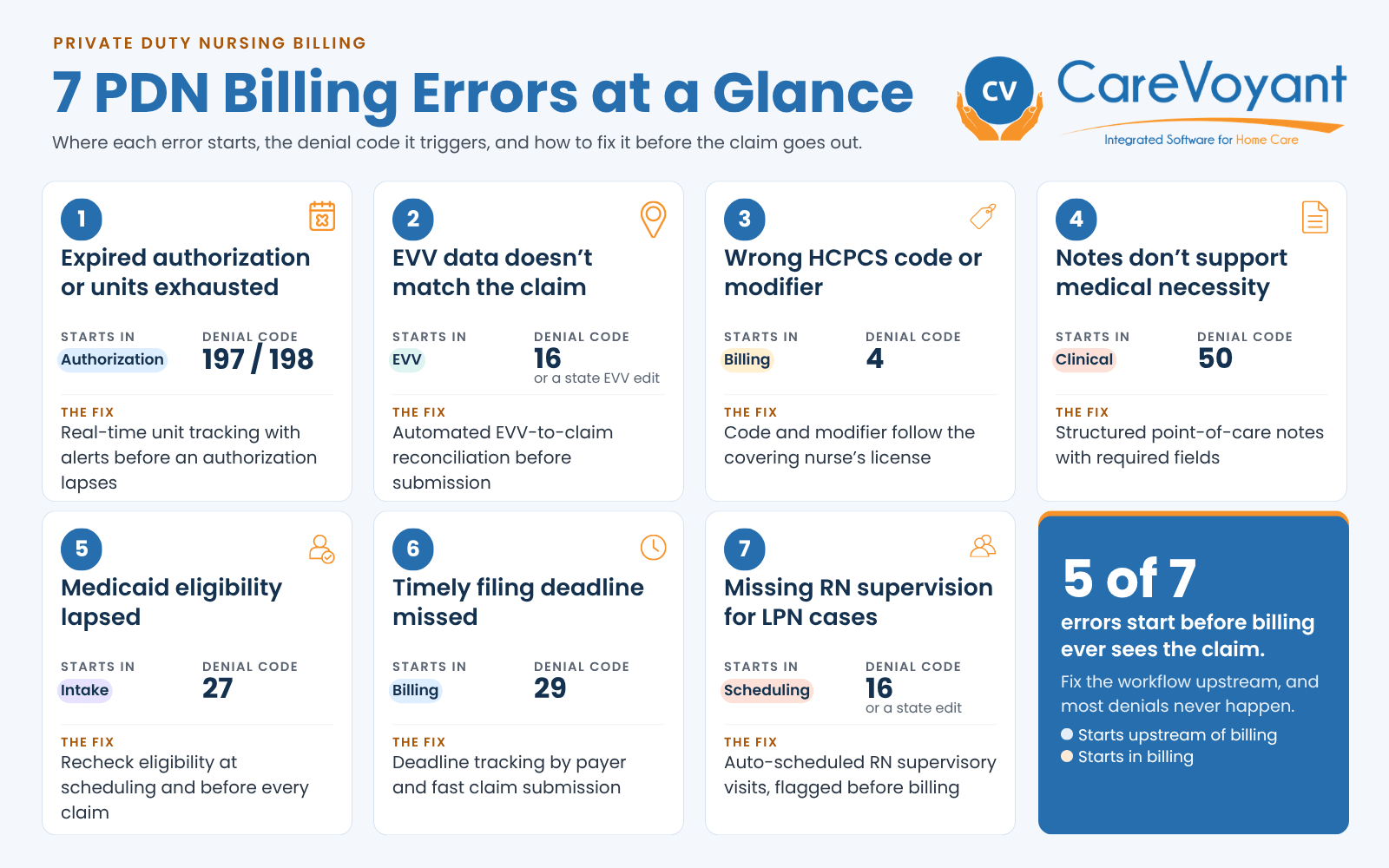
This guide covers the seven most common PDN billing errors, what causes each one, and how private duty nursing software catches them before a claim is submitted.
What Makes Private Duty Nursing Billing So Complex
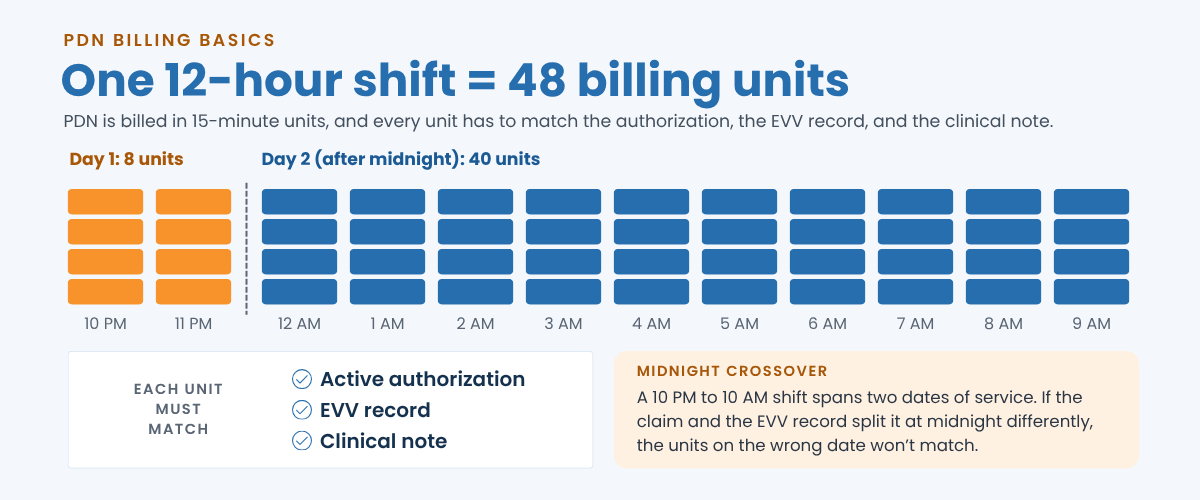
PDN is billed in 15-minute units using HCPCS codes such as T1000, T1002, and T1003, not as single visit claims. A 12-hour shift equals 48 billable units. Every unit must match an active prior authorization, a verified EVV record, and a clinical note.
Most PDN agencies also bill several payers at once: Medicaid fee-for-service, Medicaid managed care organizations (MCOs), and private pay. Each payer can require different codes, modifiers, and filing deadlines.
Add rotating nurses across continuous shifts, and there are many places for an error to slip in. As we covered in our look at the challenges of private duty nursing and how technology helps, this is why PDN agencies need software built for shift-based care rather than a generic home health platform. The seven billing errors below are the ones PDN agencies run into most often.
Error #1: Prior Authorization Expired or Units Exhausted
Medicaid programs require prior authorization for PDN. Agencies receive approval for a set number of nursing hours per authorization period. A claim is denied when:
Services were delivered after the authorization end date
The claim exceeds the total approved units
The authorized level of care (RN hours, for example) doesn't match what was billed
Authorization pressure is a system-wide problem. A 2023 HHS Office of Inspector General report found that Medicaid MCOs denied one in every eight prior authorization requests, a 12.5% denial rate. For PDN agencies, renewals add more pressure. Each renewal needs physician orders, updated medical necessity documentation, and payer submission, which can take weeks. If no one tracks renewals in real time, nurses keep working on an expired authorization and the agency delivers hours it can't bill.
Expired authorization denials often cover entire shifts or several days of care. That makes them among the costliest PDN denials. For practical steps, see our guide on how to prevent overscheduling on expired authorizations.
Prevention: CareVoyant's authorization and plan of care management tracks unit use in real time and sends alerts at thresholds you set, before an authorization lapses. Scheduling rules block shifts that fall outside active authorization limits, so the problem is stopped at the source instead of at claim submission.
Error #2: EVV Data Doesn't Match the Claim
Section 12006(a) of the 21st Century Cures Act requires states to use electronic visit verification (EVV) for Medicaid personal care and home health services or face reductions in federal Medicaid funding. Many states also apply EVV to PDN. Because the rules differ, confirm the EVV requirements in each state where you operate.
A claim is denied when the EVV record doesn't match the claim on any of the six required data elements:
Type of service
Individual receiving the service
Date of service
Location of service
Individual providing the service
Start and end times
PDN creates EVV mismatches that visit-based billing rarely sees:
Midnight crossover shifts. A 10 PM to 6 AM shift gets recorded under the wrong date.
Early clock-ins. A nurse clocks in from the car, and GPS flags the wrong location.
Back-office edits. A supervisor adjusts a shift time without updating the EVV record.
Split shifts. Two nurses covering one shift are logged under a single EVV entry instead of two.
Review every shift that crosses midnight before you bill it. The date of service on the claim has to match the EVV record exactly, and overnight shifts are where the two most often drift apart.
These are operational errors, but they land as billing denials. The service was already delivered and the nurse already paid. The agency can often correct the EVV record and resubmit, but only if someone catches the mismatch before the filing window closes. After that, the only path left is an appeal, which takes weeks and doesn't always succeed.
Prevention: CareVoyant's EVV and CV Mobile app captures all six required data elements through GPS-verified mobile check-in and reconciles them against the schedule before claim submission. Midnight crossover shifts are handled automatically. Any manual change to a visit time requires supervisor approval and updates the matching EVV record.
Error #3: Wrong HCPCS Code or Modifier
PDN billing codes must match the licensure of the nurse who actually provided care, not the nurse originally scheduled. These HCPCS Level II codes are commonly used for PDN, though each state Medicaid program decides which codes it accepts:
| Code | Description | Unit |
|---|---|---|
| T1000 | Private duty/independent nursing service, licensed | Up to 15 minutes |
| T1002 | RN services | Up to 15 minutes |
| T1003 | LPN/LVN services | Up to 15 minutes |
| S9123 | Nursing care in the home, by RN | Per hour |
| S9124 | Nursing care in the home, by LPN | Per hour |
The most common coding errors include:
Billing T1002 (RN services) for a shift covered by an LPN or LVN
Using the wrong licensure modifier, such as TD (RN) instead of TE (LPN/LVN) on a shift an LPN worked
Leaving off state-specific modifiers your Medicaid program or MCO requires
Using a code outside the payer's contracted PDN code set
Miscounting units. A 12-hour shift is 48 units, and manual math goes wrong often.
The compliance stakes go beyond a single denial. The Texas Health and Human Services Office of Inspector General has stressed that nurse licensure, modifiers, and units must reflect the services actually provided. In one recent case, a Texas home health provider settled for $1,721,586 after its records did not support the TD (RN) modifier billed for some clients, or some of the units billed. Even unintentional errors, like a billing template that wasn't updated when the covering nurse changed, create audit exposure well beyond the original claim. Our guide to staying compliant with OIG home care billing rules covers the wider picture.
Prevention: CareVoyant's billing and revenue cycle management links caregiver credentials directly to billing, so the system applies the HCPCS code and modifier that match the covering nurse's actual licensure. Payer-specific billing templates enforce each payer's code set, and automatic unit calculation converts shift hours to billing units with no manual math.
Bill for the nurse who worked the shift, not the nurse on the original schedule. When credentials, schedules, and billing live in one system, the right code and modifier follow the covering nurse automatically. See how it works in a demo.
Error #4: Incomplete Documentation to Support Medical Necessity
Documentation is the largest driver of improper payments in home-based care. According to CMS compliance data for Medicare home health services, insufficient documentation caused 51.4% of home health improper payments in the 2024 reporting period, and medical necessity errors caused another 33.7%. Medicaid PDN claims face similar review. Claims are denied, or recouped on audit, when:
Nursing notes are incomplete or generic
Physician orders are unsigned or expired
The services billed don't match the plan of care
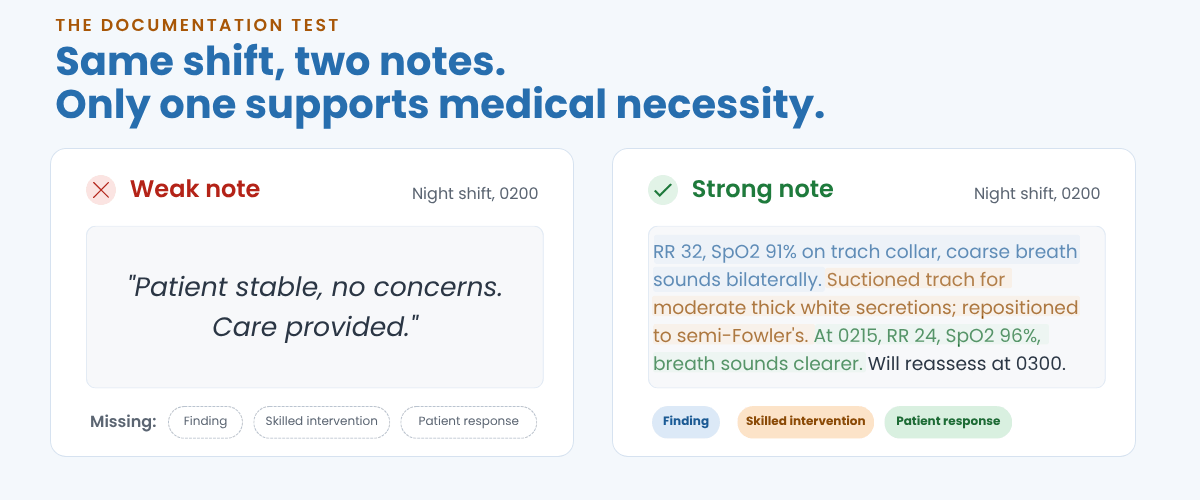
The PDN-specific risk is shift fatigue. Nurses working 8- or 12-hour shifts, especially overnight, often write brief, templated notes instead of detailed skilled care documentation. A note that reads "patient stable, no concerns" on every shift weakens the case for continuous skilled nursing.
A complete PDN nursing note includes:
Vital signs and assessment findings tied to the diagnosis
The skilled interventions performed, not just "care provided"
The patient's response to those interventions
Any change in condition and the action taken
Medication administration and the patient's response
If a note could describe any patient on any shift, it won't support medical necessity. Every note should name a specific finding, the skilled intervention performed, and how the patient responded.
Expired physician orders make the problem worse. Renewal schedules vary by state program, so track each patient's order expiration date as closely as the authorization end date. For a closer look at the gaps that create the most risk, see our post on the most common PDN documentation mistakes.
Prevention: CareVoyant's clinical and point-of-care documentation uses structured templates with required fields nurses can't skip. Nurses document at the bedside on the mobile app, not hours later. Physician order expiration alerts keep renewals on schedule, and documentation quality flags tell supervisors when a note is missing required clinical elements, before it becomes denial evidence.
Error #5: Medicaid Eligibility Not Verified at the Time of Service
A claim is denied when the patient wasn't enrolled in Medicaid on the date of service, even if they were eligible the day before and regain coverage the following week. Eligibility lapses happen for predictable reasons:
Missed redetermination deadlines
Household income changes in pediatric cases
Patients aging out of EPSDT coverage at 21
Administrative gaps during health plan transitions
Most agencies verify eligibility at intake and never check again. A patient who was eligible on the 1st can lose coverage mid-month with no warning to the agency. Medicaid churn has made this worse. After continuous enrollment protections ended in 2023, millions of people were disenrolled during redeterminations, and policy changes keep reshaping coverage. Our post on 2025 Medicaid changes for home care agencies breaks down what those shifts mean for your agency.
Our guide to verifying Medicaid eligibility quickly walks through a practical workflow for real-time eligibility checks.
Prevention: CareVoyant's intake module supports automated eligibility verification at scheduling and again before claim submission. Claims with inactive eligibility are flagged before they go out, not after they're denied. When a patient's eligibility changes, the care team gets an alert so billing and care decisions can be adjusted before more services are delivered.
Error #6: Timely Filing Deadline Missed
Every payer sets a deadline for submitting claims after the date of service. Federal rules require Medicaid fee-for-service claims to be submitted within 12 months of the date of service, and many states and MCOs set shorter windows. Claims filed late are denied for untimely filing. These denials are among the hardest to overturn and often can't be appealed at all.
Your real filing deadline is set by your strictest payer, not your most common one. Track the shortest MCO filing window you bill, and build your submission schedule around it.
PDN agencies are especially exposed. Reconciling shift data, EVV records, and authorization units takes longer than processing a single visit claim. Agencies that do this by hand, or across disconnected systems, build backlogs that push claims past their filing windows. The pressure is growing. Experian Health's 2025 State of Claims survey found that 41% of providers now face denial rates of 10% or higher. Timely filing denials hurt most because they are permanent write-offs, not rework.
Fast, clean submission also depends on choosing the right clearinghouse for your agency. When late claims pile up, A/R ages quickly. Our post on solving home care A/R over 90 days covers the downstream financial impact.
Prevention: CareVoyant's billing workflows submit validated claims to payers within 24 to 48 hours of shift completion. Filing deadline tracking sends alerts before any claim nears its window. Reports and dashboards show denial trends by payer and reason, so a single timely filing denial is flagged as a pattern before others follow.
Error #7: Missing RN Supervision Documentation for LPN Cases
In many states, LPN and LVN services in PDN require documented RN supervision. In Texas, for example, Texas Administrative Code §363.305 requires a PDN provider to be an RN, an LVN under the supervision of an RN, or a licensed home and community support services agency (HCSSA). Other states set their own supervision rules. Claims for LPN services can be denied or recouped when:
RN supervisory visit documentation is missing or late
Supervisory visits don't meet the frequency your state requires
An LPN's notes describe a task outside their scope under the state nurse practice act
One missing RN supervisory visit record can put every LPN claim in that period at risk. Treat supervisory visits like authorizations: scheduled, tracked, and flagged before billing.
Some state programs also require an RN assessment, often billed as T1001 (nursing assessment/evaluation), when an LPN-led case begins or when RN oversight is documented. Check your state's PDN provider manual. A missing assessment record gives auditors a reason to question every LPN claim in that period. Matching each nurse's licensure and skills to the patient's needs from the start helps prevent these gaps, as we explain in our post on patient-clinician matching with private duty home care software.
Prevention: CareVoyant's scheduling module automatically schedules required RN supervisory visits based on each patient's care program and state rules. The billing workflow flags LPN claims for any period missing a supervisory visit record. Credential and scope-of-practice tracking alerts supervisors when a note describes a task that requires a higher licensure level.
Quick Reference: Common Denial Codes Behind PDN Billing Errors
Most denials come back with a Claim Adjustment Reason Code (CARC) on the remittance. Payers and state programs may also use their own edit codes, especially for EVV. These are the standard CARCs you'll see most often for the errors above:
| PDN billing error | Common CARC | What it means |
|---|---|---|
| Expired authorization | 197 | Precertification/authorization absent |
| Authorized units exhausted | 198 | Precertification/authorization exceeded |
| EVV mismatch | 16 or a state EVV edit | Claim lacks information or has a submission/billing error |
| Wrong code or modifier | 4 | Procedure code is inconsistent with the modifier used |
| Medical necessity not supported | 50 | Not deemed a medical necessity by the payer |
| Eligibility lapse | 27 | Expenses incurred after coverage terminated |
| Timely filing missed | 29 | The time limit for filing has expired |
| Missing RN supervision | 16 or a state edit (often found on audit) | Claim lacks information or has a submission/billing error |
The Real Problem: PDN Denials Are a Systems Issue
Every error above follows the same pattern. Look upstream:
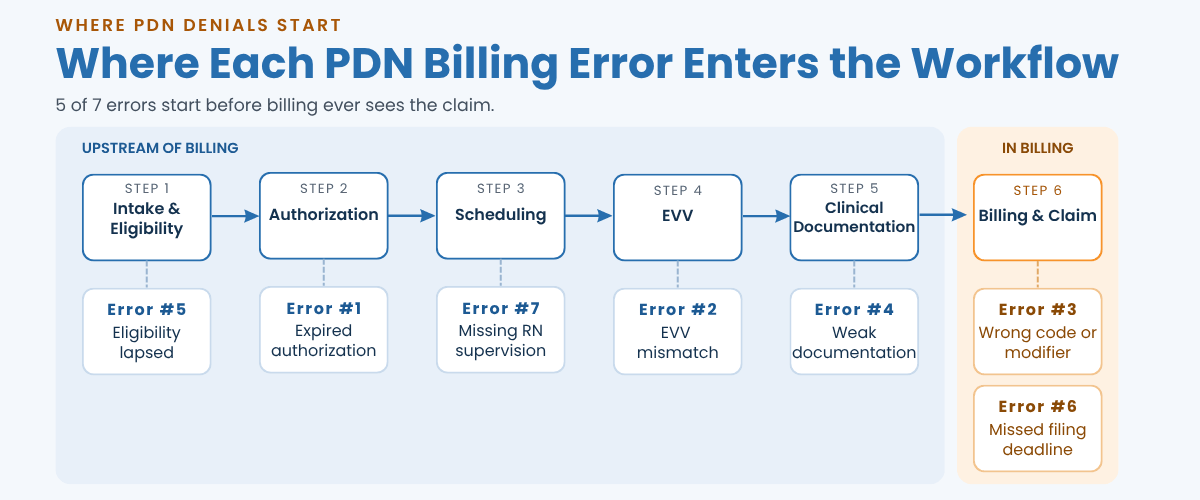
When any link in that chain breaks, the claim inherits the error. Billing teams at the end of the chain are trying to submit clean claims from flawed upstream data. No amount of billing skill can fix an EVV mismatch that happened six days ago on a night shift.
CMS data points the same way. In FY 2025, 77.17% of Medicaid improper payments came from insufficient documentation. The root cause is rarely fraud. It's disconnected systems and manual handoffs that leave data gaps neither the clinical team nor the billing team can see in real time.
Agencies with the lowest denial rates connect scheduling to authorization, reconcile EVV with claims automatically, document at the point of care, and recheck eligibility before billing. That's the approach behind integrated home care software that improves data visibility. To see whether it's working, track denial rate alongside the other top 10 KPIs for private duty nursing agencies.
Stop PDN Claim Denials Before They Start
PDN billing denials follow predictable patterns, and most are preventable. The seven errors in this guide trace back to the same upstream gaps: authorizations not tracked in real time, EVV records that don't reconcile automatically, documentation completed after the fact, and eligibility that isn't rechecked before billing.
CareVoyant's Private Duty Nursing Software connects authorization tracking, EVV, point-of-care documentation, and billing on one platform, so your agency catches errors before they turn into denied claims.
Frequently Asked Questions
-
Authorization problems are among the most common and most costly causes: claims billed after an authorization expired or after approved units ran out. Prior authorization is a pressure point across Medicaid managed care. A 2023 HHS OIG report found that MCOs denied one in eight prior authorization requests. Real-time authorization tracking is one of the most effective ways to protect PDN revenue.
-
Yes. Section 12006(a) of the 21st Century Cures Act requires EVV to capture six data elements for Medicaid personal care and home health services, and many states apply EVV to PDN. A mismatch between EVV data and the claim, such as a midnight crossover date error or a GPS location flag, can lead to a denial in states that match EVV records to claims.
-
Common PDN codes are T1000 (private duty nursing, licensed, per 15 minutes), T1002 (RN services, per 15 minutes), T1003 (LPN/LVN services, per 15 minutes), S9123 (RN home nursing, per hour), and S9124 (LPN home nursing, per hour). Each state Medicaid program decides which codes it accepts. The code and licensure modifier (TD for RN, TE for LPN/LVN) must match the nurse who actually provided care.
-
Fix the root causes in operations, not just at the billing stage. According to the CMS FY 2025 Improper Payments Fact Sheet, 77.17% of Medicaid improper payments resulted from insufficient documentation. Integrated PDN software that connects scheduling, EVV, clinical documentation, and authorization management closes data gaps before they become denials.
-
The claim is denied and often can't be appealed. Federal rules require Medicaid fee-for-service claims within 12 months of the date of service, and many states and MCOs set shorter limits. For ways to protect cash flow when claims back up, see our guide on reducing unbilled claims and improving home care cash flow.
About CareVoyant
CareVoyant is a leading provider of cloud-based integrated enterprise-scale home health care software that can support all home-based services under ONE Software, ONE Patient, and ONE Employee, making it a Single System of Record. We support all home based services, including Home Care, Private Duty Nursing, Private Duty Non-Medical, Home and Community Based Services (HCBS), Home Health, Pediatric Home Care, and Outpatient Therapy at Home.
CareVoyant functions – Intake, Authorization Management, Scheduling, Clinical with Mobile options, eMAR/eTAR, Electronic Visit Verification (EVV), Billing/AR, Secure Messaging, Notification, Reporting, and Dashboards – streamline workflow, meet regulatory requirements, improve quality of care, optimize reimbursement, improve operational efficiency and agency bottom line.
For more information, please visit CareVoyant.com or call us at 1-888-463-6797.
Request for Information
To learn more about CareVoyant Software and how we improve the operational efficiency of Home Healthcare Agencies, contact us:
